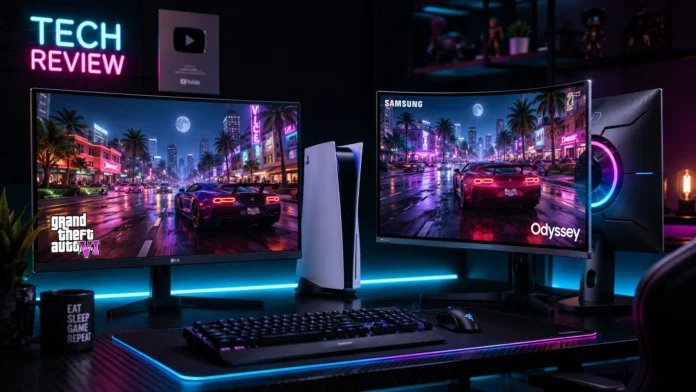
The visual majesty of Vice City means absolutely nothing if your display cannot process the data fast enough to keep up. Rockstar Games has designed the state of Leonida with dense neon lighting, massive rendering distances, and hyper-fluid physics pipelines. While millions of players will hook their consoles up to standard living room televisions, competitive gamers and desktop setup enthusiasts require the sharp, low-latency execution of a dedicated gaming monitor.
Choosing the right panel for the PlayStation 5 is notoriously confusing due to competing port standards, variable refresh rates, and resolution upscaling caps. Do you need native 4K? Is 1440p the better sweet spot for performance? Do you actually need a 144Hz refresh rate for a console game? In this hardware guide, we dissect the exact technical requirements to find the best monitor PS5 GTA 6 players can buy in 2026.
For the ultimate, uncompromised Grand Theft Auto 6 visual experience, the LG 27GP950-B is our top choice. It offers native 4K resolution, full HDMI 2.1 bandwidth for high-framerate support, and exceptional color clarity. If you prefer immersive, curved displays and plan to utilize the PS5’s native 1440p performance modes, the Samsung Odyssey G7 offers incredible contrast and elite motion handling at a lower price point.
Decoding the Specs: 4K vs 1440p vs 144Hz
Before buying a monitor, you must understand exactly what the PlayStation 5 is capable of outputting. Buying a monitor that exceeds the console’s hardware caps is a complete waste of money.
Here is how the three main monitor marketing metrics impact your GTA 6 experience:
| Display Metric | PS5 Compatibility | Impact on GTA 6 Gameplay |
|---|---|---|
| 4K Resolution (2160p) | Native Full Support | Provides maximum sharpness for “Fidelity Mode” ray-tracing |
| 1440p Resolution (QHD) | Native Support (Added via Patch) | The sweet spot for maximizing frames in “Performance Mode” |
| 144Hz / 120Hz Refresh Rate | Caps at 120Hz via HDMI 2.1 | Crucial for VRR (Variable Refresh Rate) to eliminate screen tearing |
LG 27GP950-B — The 4K HDMI 2.1 King
To pull a 4K image at high framerates out of a PlayStation 5, a monitor must possess specialized HDMI 2.1 ports. Without them, the console limits your bandwidth. The LG 27GP950-B is widely considered the gold standard for desktop PS5 setups because it checks every single next-gen box flawlessly.
LG 27GP950-B (27-Inch)
- Panel Type Nano IPS (Incredible Color Range)
- Resolution Native 4K UHD (3840 x 2160)
- PS5 Sync HDMI 2.1 (Unlocks 4K @ 120Hz VRR)
- Input Lag 1ms Response (Zero Ghosting)
Why the LG Excels in Vice City
GTA 6 utilizes incredibly vibrant, hyper-saturated color palettes. The Nano IPS panel inside the LG pushes HDR (High Dynamic Range) colors brilliantly, meaning the glowing neon signs of Vice City will pop distinctly against pitch-black night skies. Furthermore, because it supports full HDMI 2.1 bandwidth, if Rockstar includes an “Unlocked Framerate” VRR mode, this monitor will perfectly sync with the console, preventing screen tearing during massive explosions.
Samsung Odyssey G7 — The 1440p Curve Master
Not everyone wants to pay the massive “4K Tax.” Because the PlayStation 5 now natively supports 1440p output, scaling down your resolution slightly allows you to buy elite-tier panel technology at a fraction of the cost. The Samsung Odyssey G7 is an aggressive, deeply curved monitor designed for total immersion.
Samsung Odyssey G7 (27 or 32-Inch)
- Panel Type High-Contrast VA Panel
- Resolution Native 1440p (QHD)
- Curvature Aggressive 1000R Immersion Curve
- Black Levels Elite dark room contrast performance
Why the Odyssey G7 is a Tactical Choice
In competitive GTA Online lobbies, spotting an enemy hiding in a dark alleyway is critical. VA panels (like the one used in the Odyssey G7) provide vastly superior contrast ratios compared to IPS panels, meaning “black” actually looks black, rather than glowing gray. Additionally, the aggressive 1000R curve wraps the mini-map and UI elements closer to your peripheral vision, reducing eye strain during marathon heist sessions.
You will frequently see monitors advertised as “144Hz” or “240Hz.” While amazing for PC gamers, the **PlayStation 5 hardware is hard-capped at 120Hz**. Buying a 240Hz monitor will not make GTA 6 run at 240 frames per second. However, buying a 144Hz monitor is still required, as the PS5 will simply utilize the first 120Hz of that panel’s capacity to deliver flawlessly smooth gameplay.
Head-to-Head: Which Should You Buy?
✅ Choose the LG 4K Display If:
- You prioritize razor-sharp, cinematic single-player graphics
- You plan on using the “Fidelity” Ray-Tracing mode in GTA 6
- You sit very close to your desk and want maximum pixel density
✅ Choose the Samsung 1440p Curve If:
- You prioritize playing GTA Online on high-speed “Performance Mode”
- You play in a dark room and want incredibly deep, inky black levels
- You want the immersive, wrap-around feeling of a curved screen
Final Thoughts
Your display is the final lens through which you experience all of your console’s expensive hardware rendering. Bottlenecking a next-generation PS5 (or the upgraded PS5 Pro) through a cheap 1080p, 60Hz office monitor completely ruins the generational leap. Upgrade your panel, secure your HDMI 2.1 cable, and prepare your eyes for the neon glow of Leonida.
Frequently Asked Questions — PS5 Monitors
Does the PS5 support ultrawide (21:9) monitors for GTA 6?
What is VRR and why is it important for GTA 6?
Do I need to buy a special HDMI cable for 4K 120Hz gaming?