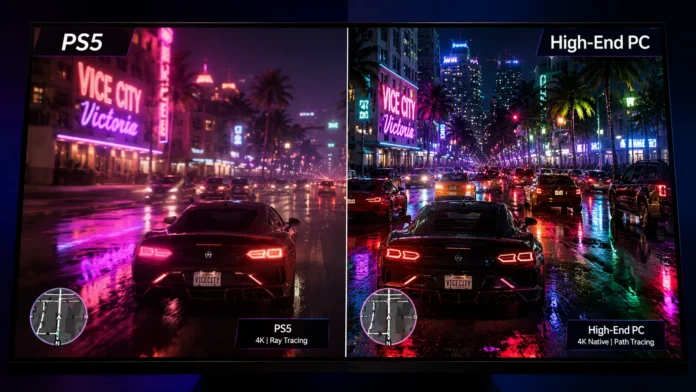
The visual leap from Grand Theft Auto 5 to Grand Theft Auto 6 is not just a generational step—it is a complete paradigm shift. Rockstar’s upgraded RAGE engine introduces global illumination, highly complex fluid dynamics, and a level of pedestrian density never before seen in gaming. But as we edge closer to the late 2026 console launch, the age-old hardware debate is firing up again: how will Sony’s flagship console hold up against the brute force of a high-end Windows PC?
While the PC version is historically subjected to a staggered release window, developers are already analyzing the RAGE engine’s scalability. Because the PS5 relies on a fixed hardware architecture, developers must use dynamic scaling tricks to keep the framerate stable. High-end PCs, however, can simply brute-force the engine. In this definitive guide, we break down the GTA 6 PS5 vs PC graphics showdown to see exactly what you gain—and lose—on each platform.
In a direct GTA 6 PS5 vs PC graphics comparison, the PlayStation 5 utilizes intelligent AI upscaling (PSSR on the Pro, FSR on the base) to deliver an excellent 4K-like image at 30 or 60 FPS with baseline ray tracing. A High-End PC unlocks the engine’s true ceiling: native, uncompressed 4K resolution, unlocked framerates (120+ FPS), full path-traced lighting, and significantly denser pedestrian and traffic physics.
Resolution and Texture Clarity: Dynamic vs Native
The most immediately noticeable difference between a console and a high-end desktop rig is image sharpness, especially in the background of wide landscape shots.
| Graphics Metric | PlayStation 5 / Pro | High-End PC (RTX 4080+) |
|---|---|---|
| Render Resolution | Dynamic (1080p to 1440p upscaled) | Native 4K (2160p) |
| Framerate Cap | Locked 30 FPS or 60 FPS | Unlocked (120Hz / 144Hz+) |
| Anti-Aliasing | FSR / PSSR (Softens edges) | DLAA / DLSS 3 (Razor sharp) |
On the PlayStation 5, the console constantly shifts its internal rendering resolution to prevent framerate drops during heavy action. If an explosion goes off, the resolution dips slightly, and AI fills in the gaps. On a massive 65-inch OLED TV, this can occasionally make distant skyscrapers or fine foliage look “shimmering” or fuzzy. A PC rendering native 4K pixels creates an image so sharp it looks like a photograph.
Lighting Vice City: Ray Tracing vs Path Tracing
Vice City comes alive at night. The neon glow of Ocean Drive reflecting off the wet pavement is a massive technical hurdle. The lighting engine is where the gap between console and PC graphics widens the most.
PS5 Hybrid Ray Tracing
- Reflections Limited to high-gloss surfaces like cars and puddles
- Shadows Standard shadow mapping (can look pixelated up close)
- Compromise Disables completely in 60 FPS “Performance Mode”
PC Full Path Tracing
- Global Illumination Light physically bounces through glass and interiors
- Reflections Mirrors perfect 1:1 reality on every single surface
- No Compromise Runs simultaneously with high framerates via DLSS 3 Frame Gen
The Performance Tax of Light
Ray tracing is notoriously punishing on hardware. While the PS5 features hardware-accelerated ray tracing, it has a strict budget. Rockstar uses hybrid techniques on console—mixing baked lighting with real-time reflections—to save power. PC gamers with an RTX 4090 or 5090 will be able to toggle “Overdrive” modes that trace every single light source accurately, transforming the game’s atmosphere entirely.
Crowd Density: The CPU Bottleneck
Graphics cards only tell half the story. The vibrant beaches and congested highways of Leonida require immense CPU processing power to manage thousands of independent AI routines simultaneously.
The PS5’s AMD Zen 2 CPU is powerful, but it has a hard limit. To keep the game from crashing, the console version has a fixed “Crowd Density” value. On PC, players historically have access to a “Population Density” slider. A high-end desktop CPU can process twice as many on-screen pedestrians and vehicles, making the PC version feel significantly more chaotic and alive.
The Graphic Verdict: Which Should You Play On?
✅ Play on PlayStation 5 If:
- You want to play the game immediately on launch day in 2026.
- You prefer playing on a massive OLED television from your couch.
- You want an incredibly optimized, bug-free experience without tweaking settings files.
✅ Wait for the PC Version If:
- You demand uncompromised 4K resolution at fluid 100+ framerates.
- You want access to graphics-enhancing mods like ENB Series or FiveM.
- You are willing to wait 12 to 18 months after the initial console launch.
Final Thoughts
Rockstar’s engine wizards are masters at squeezing every drop of graphical juice out of console hardware, ensuring the PS5 version will still look lightyears ahead of anything else on the market. Whether you dive in on day one from your couch or wait to push your $3,000 desktop rig to its absolute breaking point, Vice City is going to look stunning.
Frequently Asked Questions — Visuals
Will GTA 6 run at 60 FPS on the base PS5?
Can a mid-range PC outperform the PS5 in GTA 6?
What is the difference between PSSR and DLSS?